

TL;DR:
- Excel’s flexibility makes it the ideal tool for managing complex, bespoke wedding logistics beyond what standard apps offer. It allows for full customization, detailed tracking, budgeting, and offline access, ensuring every luxurious detail, such as champagne towers or floral installations, is meticulously organized. Successful planners treat their spreadsheets as evolving, adaptable tools, integrating advanced formulas and dedicated tabs to orchestrate every element of their extraordinary celebration.
Even the most breathtaking, lovingly planned weddings can quietly unravel behind the scenes when organisation is left to sticky notes, scattered apps, or a generic to-do list downloaded from a lifestyle blog. Upscale weddings involve dozens of moving parts, from bespoke floral installations to champagne tower logistics, and the coordination required goes far beyond anything a simple checklist can handle. Excel, when built correctly, becomes your most powerful planning companion. This guide walks you through exactly how to harness it, and how to make sure those extraordinary luxury touches, including spectacular beverage displays, are woven seamlessly into every tab.
Table of Contents
- Why Excel remains the organiser’s secret weapon for weddings
- Building your wedding checklist in Excel: Essential columns and features
- Advanced Excel tools: Formulas, conditional formatting, and real-time collaboration
- Integrating luxury service details: Making space for champagne towers and opulent displays
- The truth about wedding Excel checklists: What luxury planners won’t tell you
- Elevate your wedding with a luxury checklist and bespoke beverage displays
- Frequently asked questions
Key Takeaways
| Point | Details |
|---|---|
| Timeline visibility | Breaking tasks down by month in Excel prevents last-minute rush and ensures nothing is missed. |
| Collaboration | Using Google Sheets makes sharing and updating plans seamless with planners and suppliers. |
| Financial control | Excel formulas and a built-in budget buffer keep luxury weddings on track without unexpected expenses. |
| Luxury service integration | Structured tabs for champagne towers and displays guarantee flawless, elegant touches are on schedule. |
| Adaptability wins | Customisable Excel checklists adapt to special requests, surprise additions, or exclusive guest needs. |
Why Excel remains the organiser’s secret weapon for weddings
Many couples assume that modern wedding planning apps are the obvious choice. They are slick, colourful, and marketed specifically at brides and grooms. But for high-budget, bespoke celebrations with complex logistics, apps often fall short. They impose rigid structures, limit the number of guests you can manage, or charge premium subscription fees for features that Excel provides for free.
Excel’s real advantage is total customisation. You shape it around your wedding, not the other way around. Whether you are coordinating 300 guests across multiple venues, tracking ten different luxury vendors simultaneously, or managing a UK wedding checklist timeline that stretches across 18 months, Excel adapts to every requirement without complaint.
Key advantages of Excel over wedding planning apps include:
- Unlimited custom columns for every detail, from menu preferences to champagne tower pour times
- Formula-driven budgeting that updates automatically as quotes come in and deposits are paid
- Conditional formatting to flag overdue tasks, overspent categories, or incomplete RSVPs
- Offline accessibility, which matters when you are visiting rural venues with no signal
- Shareable versions via OneDrive or email, so planners, family, and suppliers stay aligned
“The best Excel checklists transform chaotic planning into a calm, visual system. Luxury weddings especially benefit from that structure—because the details are not optional; they are the entire point.”
Pro Tip: Assign a colour to each planning category (venue, catering, florals, entertainment, beverage displays) and apply those colours consistently across every tab. You will find what you need in seconds, even when the spreadsheet spans hundreds of rows.
Wedding checklists built in Excel typically feature month-by-month timelines spanning 12 to 18 months, task assignment columns for bride, groom, and shared responsibilities, status tracking with colour-coding, and integrated Gantt charts for progress visualisation. These features collectively make Excel far more powerful than any app for an upscale celebration.
Building your wedding checklist in Excel: Essential columns and features
With Excel’s potential established, here is how to architect your actual checklist for total visibility.
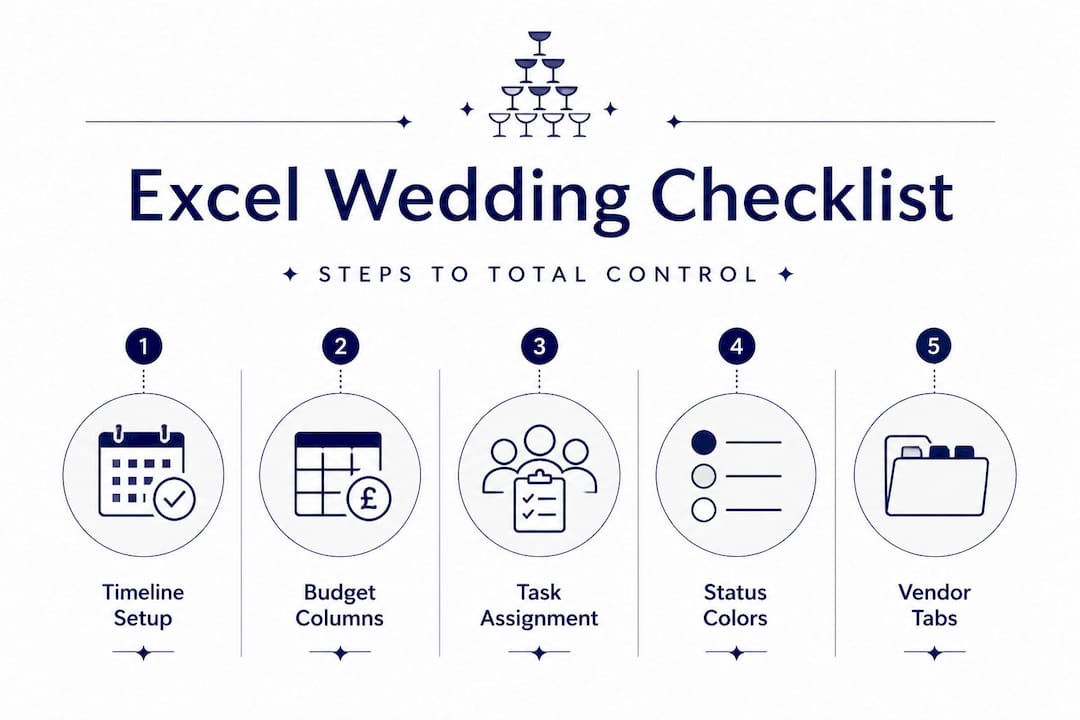
The foundation of a great wedding checklist is its column structure. Get this right from the start, and every update, reminder, and review session becomes effortless. Get it wrong, and you will spend weeks untangling a mess of misplaced data.
Start by following this numbered setup:
- Create your core columns. Begin with: Task Name, Category, Assigned To (bride/groom/planner/both), Due Date, Status, Notes, and Budget.
- Assign category codes. Use short codes like VEN (venue), CAT (catering), FLO (florals), BEV (beverage displays) so you can filter and sort instantly.
- Add a Status dropdown. Use Excel’s data validation feature to create a dropdown with options: Not Started, In Progress, Awaiting Confirmation, and Complete.
- Set up conditional formatting. Highlight overdue dates in red, tasks due within two weeks in amber, and completed tasks in green.
- Build your Gantt chart. Use a separate tab with dates across the top and task rows down the side, filling cells based on start and end dates. This gives you an immediate bird’s-eye view of your entire planning timeline.
A thorough wedding venue checklist and a detailed wedding vendor checklist each deserve their own tabs in your spreadsheet. Separating by category prevents overwhelm and makes delegation far cleaner.
Here is how Excel compares with Google Sheets for luxury wedding planning:
| Feature | Excel | Google Sheets |
|---|---|---|
| Offline editing | Yes, full functionality | Limited without internet |
| Real-time collaboration | Requires OneDrive | Built-in, instant |
| Formula power | Extensive, advanced | Strong, slightly more limited |
| Template availability | Wide range | Wide range |
| Privacy control | Full local control | Cloud-based, Google account needed |
| Cost | One-off licence or Microsoft 365 | Free |
For couples working closely with a wedding planner, a collaborative spreadsheet that covers 12 to 18 months with Gantt-chart-style progress views is invaluable. If collaboration and live editing are priorities, Google Sheets edges ahead. For couples who want complete control and offline editing, Excel wins decisively.

Pro Tip: Name each tab clearly, for example “Master Timeline,” “Budget Tracker,” “Guest List,” “Vendor Contacts,” and “Beverage Display Logistics.” When you open the file at midnight with a question about seating arrangements, you will be grateful for that clarity.
Advanced Excel tools: Formulas, conditional formatting, and real-time collaboration
Structuring is vital, but advanced features can transform your Excel checklist into a powerful management suite.
Once your basic structure is in place, it is time to introduce formulas and automation. These are what separate a useful spreadsheet from an extraordinary planning tool.
Here are the most impactful Excel functions for upscale wedding planning:
- SUMIF: Adds up spending within a specific category. For example, =SUMIF(B:B,“BEV”,G:G) totals all costs in the beverage display category instantly.
- VLOOKUP: Pulls guest details from your master list into your seating plan, dietary requirement tracker, or RSVP summary without manual entry.
- COUNTIF: Counts RSVPs by status, so you always know exactly how many confirmations, declines, and outstanding responses you have.
- IF statements: Flag when a budget category exceeds its allocation, for example: =IF(G2>H2,“OVER BUDGET”,“OK”) in the status column.
The table below shows practical wedding-specific uses for each formula:
| Formula | Example use | Wedding benefit |
|---|---|---|
| SUMIF | Total venue spend across deposits | Tracks category budgets in real time |
| VLOOKUP | Match guest name to dietary requirement | Eliminates manual cross-referencing |
| COUNTIF | Count confirmed RSVPs | Instant attendance visibility |
| IF | Flag overspent budget lines | Early warning for financial creep |
| Conditional formatting | Highlight overdue tasks in red | Visual deadline management at a glance |
Building a detailed wedding budget tracker into your Excel file is one of the single best decisions you can make. According to planning specialists, using Google Sheets for real-time collaboration with planners and suppliers is best practice, along with including a 10 to 15 percent contingency within your overall budget to absorb surprises without stress.
Conditional formatting deserves its own mention here. It is not just about colour. It can draw your attention to the tasks most likely to slip through the cracks, the vendor payment due in three days, the champagne tower confirmation that has not come back, or the dietary note that still says “unknown” for a VIP guest. Setting up these visual triggers early means you catch problems before they become wedding-week emergencies.
For real-time collaboration, particularly when your wedding planner, florist, or beverage display provider needs access, upload your file to Google Sheets or Microsoft OneDrive. Set permissions carefully. Suppliers generally need view-only or comment access; your planner may need full edit permissions. Keeping those boundaries clear prevents accidental overwrites.
Integrating luxury service details: Making space for champagne towers and opulent displays
Beyond the basics, your checklist should reflect everything that makes your celebration extraordinary.
A standard wedding checklist template rarely accounts for the layered logistics of premium service elements. A champagne tower, for example, is not simply an item to tick off. It is a choreographed experience involving a specialist hire team, specific glassware configurations, a structured pour sequence, and a carefully timed reveal for photographs. Your Excel file must reflect that complexity.
Add these columns to your beverage display tab:
- Vendor name and contact for your champagne tower specialist
- Confirmed delivery time and expected set-up duration
- Glassware count and configuration (tower size, number of tiers, glass type)
- Pour schedule with times aligned to your reception programme
- Photography timing so your photographer is positioned for the reveal
- Floral or fruit additions if you have requested strawberries, orchids, or signature garnishes
- Post-event collection or disposal logistics for glassware and equipment
Checking your elegant wedding beverage display checklist ensures no detail is overlooked. For even more granular planning, a dedicated coordinator checklist for a champagne tower can help you prepare every logistical element in advance.
This level of tracking also applies to other luxury touches. VIP guest preferences (preferred champagne brand, dietary restrictions for the canapé round, seating proximity requests), bespoke floral timing for when centrepieces are refreshed mid-reception, and even the cue for live musicians to transition into background music as the tower is poured. All of this lives in your spreadsheet.
Pro Tip: Create a separate column labelled “Photo Moment” and mark any vendor interaction or service reveal that you want captured professionally. Share that column with your photographer in advance. The best images from luxury weddings are rarely accidental.
A well-structured planning timeline with assignment columns, Gantt visualisation, and colour-coded status tracking ensures that even the most intricate beverage display logistics fit into your overall event flow without creating bottlenecks on the day.
The truth about wedding Excel checklists: What luxury planners won’t tell you
Here is something most planning guides will not say directly. The pre-built “luxury wedding checklist” templates that circulate online are designed for the average upscale wedding. They are not designed for yours.
The generic templates account for flowers, catering, and a DJ. They rarely include columns for champagne tower installation windows, VIP beverage preferences, or the timing notes needed when your display is being built on a mirrored surface that requires specialist handling. If you download a template and simply fill it in, you are fitting your extraordinary event into someone else’s framework. That is not luxury planning; it is compromise.
The couples who manage flawlessly complex weddings are the ones who treat their checklist as a living document. They update it after every supplier call. They add new tabs when a new service element is introduced. They keep a “notes and concerns” column that captures the ambiguous things, a supplier comment that seemed non-committal, a weather forecast that is not looking reliable for an outdoor moment, a guest whose dietary requirements changed two weeks before the wedding.
Adaptability is the skill that templates cannot teach you. Last-minute guest list changes, spontaneous decisions to upgrade the champagne selection, or a venue requiring different setup timings on the day all demand a planner who treats their spreadsheet as a tool, not a bible.
We also strongly recommend creating multiple tabs for complex coordination. One tab for your luxury wedding to-do list ideas, one for beverage display logistics, one for flowers, one for VIP guest preparation, and one overarching master view. That architecture lets you drill into any detail without losing the big picture.
Luxury is not a tick box. It is a feeling that results from a thousand small details handled correctly. Your checklist is where those details live.
Elevate your wedding with a luxury checklist and bespoke beverage displays
You now have the framework to build a genuinely powerful Excel planning system, one that handles your timelines, budget, vendors, and luxury service details with elegance and precision. The next step is putting it into action with the right partners by your side.
For couples ready to bring their beverage vision to life, our wedding beverage display checklist is an expert-curated resource that integrates seamlessly with your Excel planning file. It covers every detail from glassware quantities to pour timing and photography cues.
When you are ready to explore bespoke champagne tower options, from intimate five-tier designs to grand statement towers with floral additions and fully staffed service, we invite you to get in touch. At Champagne Tower Hire, we work alongside your planner and your spreadsheet to ensure every moment of your display is as spectacular as you imagined. Because a great checklist deserves an equally brilliant celebration to match it.
Frequently asked questions
What should a luxury wedding checklist in Excel include?
It should feature month-by-month timelines, assignment columns for each task, status tracking with colour-coding, integrated Gantt charts, and dedicated sections for premium service notes such as champagne tower logistics and VIP preferences.
How do I collaborate on a wedding Excel checklist with my planner?
Use Google Sheets for real-time sharing and live updates, particularly when managing changing guest lists or coordinating timings with luxury vendors such as champagne tower specialists.
What are the most helpful Excel formulas for wedding budgeting?
SUMIF lets you track spending by category automatically, while VLOOKUP simplifies cross-referencing guest data with seating plans, dietary notes, and RSVP confirmations.
How can I personalise my checklist for signature beverage displays?
Add dedicated vendor, timing, styling, and tasting columns to your spreadsheet, then align those entries with your photography schedule so every pour and reveal is captured at its most spectacular.
Recommended
- The ultimate UK wedding checklist timeline for a flawless day – Champagne Tower Hire
- Wedding budget checklist: Plan every UK expense with confidence
- The ultimate wedding venue checklist for a luxurious UK celebration – Champagne Tower Hire
- Your ultimate destination wedding checklist for luxury
- Essential event management checklist for entertainment agencies – LiveDesk CRM
- Checkliste Glaswaren Hochzeit: Die Perfekte Gläserwahl – Shotglass24


